Proton Lets You Give AI Agents Access to Your Passwords – With a Kill Switch
If you’ve ever tried to get an AI assistant to handle a real task, such as booking something, managing your calendar, or logging into a service on your behalf, you’ve probably run into the same awkward problem: how do you give it the password it needs without handing over the master keys to your entire digital life?
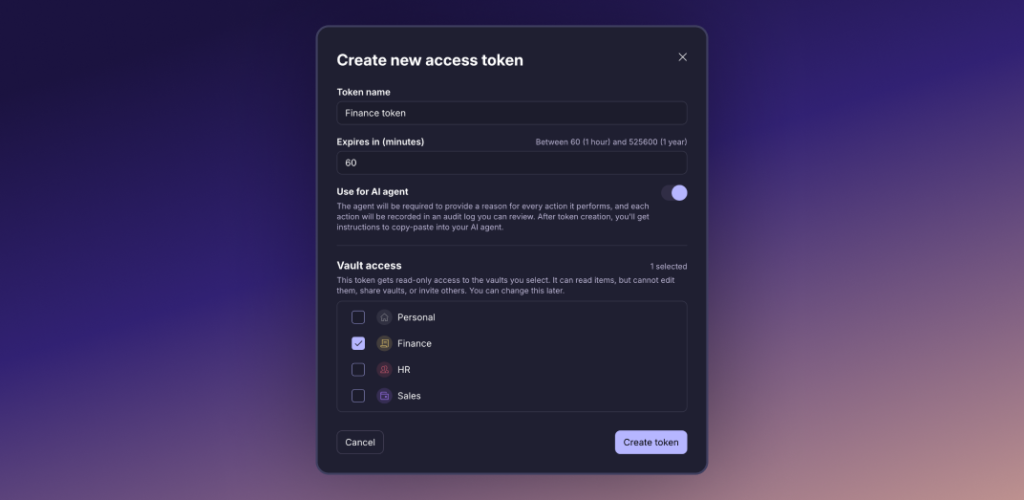
Swiss privacy company Proton has the answer. Today, it’s launching Proton Pass for AI Agents, a new feature baked into its password manager that lets you create special access tokens, temporary, limited permission slips, specifically for AI tools.
So What Does It Actually Do?
Think of it like a guest key for your house. Instead of giving your AI agent your full login details, you create a token that only opens specific doors (the credentials the agent actually needs for a specific job) and nothing else.
The tokens are read-only, so the AI can use your credentials to log in or pull data, but it can’t change anything, create new entries, or delete items. You can set them to expire automatically after a fixed period or revoke them instantly the moment you don’t need that agent working on your behalf anymore.
Every time the AI uses a token, it also has to provide a reason for accessing the credentials, and that gets logged, so you can see exactly what your AI assistant has been up to.
Why This Matters Right Now
AI agents, tools that can autonomously complete multi-step tasks on your behalf, are having a bit of a moment. But the excitement has outpaced practical security thinking. Many people using these tools today are pasting passwords directly into chatbot prompts, sharing API keys in plain text, or setting up integrations with far more access than any individual task requires.
According to McKinsey research, 62% of companies are experimenting with AI agents, but only 23% are rolling them out at scale. Security worries are a big reason for the gap. Proton is betting that a proper credential framework could help businesses and individuals feel more comfortable letting AI get on with the job.
“With Proton Pass for AI Agents, we’re bringing password management into the era of agentic AI with security and transparency at its core,” said Son Nguyen Kim, Head of Proton Pass
What Can Your AI Agent Actually Do With This?
Proton says the tokens are designed to work with a broad range of AI-powered tasks. Some examples it gives:
- Letting an AI categorise your bank transactions by giving it read-only access to your banking credentials
- Having an AI pull together a pre-meeting summary by accessing your CRM data
- Automating Jira ticket management without handing over your full Atlassian login
- Generating health or fitness summaries from connected app data
- Conducting research tasks that require authenticated access to services
Any credential type stored in Proton Pass is supported: passwords, API keys, bank card details, email aliases, and other sensitive items, all of which remain protected by Proton’s end-to-end encryption.
Getting Started
Setup is designed to be straightforward. You create a token inside Proton Pass settings, configure which vault items it can access and for how long, then pass the token and setup instructions to your AI agent or automation tool of choice.
Proton has kept it platform-agnostic, so you’re not locked into a specific AI assistant. Whether you’re using a custom workflow, a popular AI agent platform, or something more bespoke, the token system should slot in.
How Much Does It Cost?
Good news for existing Proton subscribers: AI access tokens are included at no extra charge. The feature is available to anyone on Proton Pass Plus, Pass Professional, Pass Family, Proton Unlimited, or Proton Workspace plans, starting today.
If you’re not already a Proton Pass user, the company’s Unlimited plan, which bundles the password manager with Proton Mail, VPN, Drive, and Calendar, starts from a few pounds a month.
More details are available can be found here: https://proton.me/blog/pass-access-tokens, and you can start creating tokens straight away in the Proton Pass settings.




