Turn Old Videos into High-Resolution with the Zawa Video Enhancer
Old videos can contain memories you do not want to discard, and you want a better viewing experience. Even so, some videos naturally appear low-quality due to compression and optimisation.
But then, you can turn your old videos into high-resolution videos that look much better. Herein, the Zawa AI Video Enhancer is your best shot.
What is AI Video Enhancing?
AI video enhancement is the upscaling of video quality using artificial intelligence. Your video recordings or downloads may naturally be of low quality and considered unsuitable for classic viewing. It may appear grainy on a big screen. AI video enhancement fixes these inadequacies for a better appearance and viewing.
If you are looking for ways to improve your video, an AI-powered video enhancer offers solutions with a natural finish. This is achieved through high-pixel restorations that produce clearer, sharper videos.
What Types of Videos Can I Enhance?
When it comes to videos, you can enhance different formats. Video files are in various resolutions based on their production and download source. These include the common 640×300 pixel resolution, 720P, and the more standard 1080P.
You can enhance these resolutions to a higher format, such as 2K and Ultra HD 4K, for a sharper view. With the Zawa AI video enhancer, enhancement takes just a few seconds.
Also, MP4, MOV, and MFV formats are compatible with the Zawa AI enhancer. However, videos shot on digital cameras and drones vary; enhancement works for both types of footage.
The Zawa AI Video Enhancer Features
The Zawa AI Video Enhancer offers a range of features. From upscaling video resolution to fixing blurriness, the AI tool offers editing features to meet users’ needs.
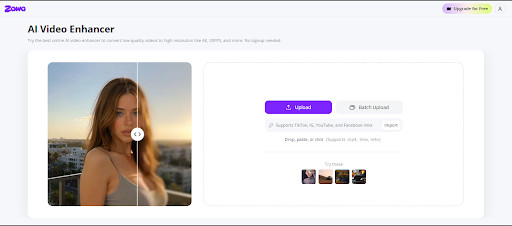
Video Enhancer
You can upscale your videos to higher resolutions, up to 4K, with the Zawa AI video enhancer. Although the platform does not support uploads above 1080P resolution, it processes and delivers outputs with super clarity and sharpness. The AI enhances video quality and adds natural details without over-processing for the perfect result.
Blurry/Old Video Restoration
Need to restore old personal or family memories? The Zawa AI video enhancer refreshes memories with a simple AI fix. You can upgrade old family videos, clarify vlogs, and smooth out blurs in some parts of your videos. With a built-in video sharpener, the AI automatically deblurs and improves video resolutions for any use case. Plus, you can fix low-res videos on your old devices and increase frame rate and video clarity.
Studio-grade Footage
Aside from personal viewing, you can create video content for social media or promotions. If this is not in place by default, the Zawa AI provides a studio-grade level enhancement. A polished video makes a big difference for products and draws customers’ attention. With 4K video resolution, you can get professional editing without a studio editor.
Vintage Repair
The Zawa AI Video Enhancer features restoration of old clips for a vintage look. Eject grainy frames with one click and sharpen your video edges in real time with the enhancer. In addition to classic retouching, you can restore your clips’ texture for a professional look. Social media and e-commerce audiences consider content quality. Herein, the vintage repair of the Zawa AI is an edge.
Color Correction
Auto-correct video colours with the Zawa AI-powered video quality enhancer. The tool comes with a built-in colour correction feature. That is, users can produce clear and vibrant footage after upload. Also, the AI provides greater colour clarity by brightening dark areas and adjusting the video lighting. With the fix, video outputs look more balanced and vibrant.
Noise Reduction
Reduce and remove noise effects with the Zawa AI. The AI produces noise-free videos that may be due to natural compression. And you can clear the artefact remnants with the optimiser tool. If you are uploading a standard or non-standard file, you can be sure of crisper and richer output that is ready for large-screen viewing and marketing.
User-Friendly Interface
The Zawa AI offers an intuitive and user-friendly interface that is easy to understand, even for users new to editing. With a one-click method, the AI receives footage for fast processing. It improves video quality automatically. No editing skills required to navigate the page.
How to Upscale Videos with the Zawa AI Online
Enhancing videos with the Zawa AI video enhancer is a fast and instant process. You can easily enhance your footage in just a few steps.
Open the Zawa AI Video Enhancer
Visit the Zawa AI Image Enhancer online page to start the video enhancement process.
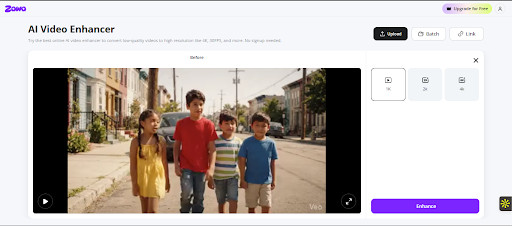
Upload Your Video
Drag and drop your video, or select a file from your device to upload and process it. The Zawa AI supports a single upload, and you can upload multiple files at once for batch processing. It also supports importing TikTok and IG links for direct upload, eliminating the need to re-upload from your device. You can upload your videos in MP4, M4V, and MOV formats.
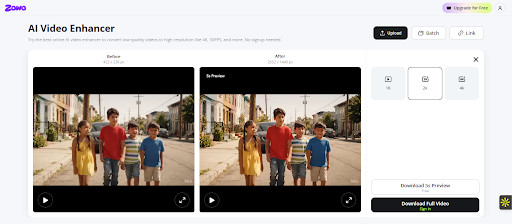
Wait for Processing
After upload, the AI tool instantly and automatically enhances the video resolution. There is no manual editing required. And the time frame depends on the stable internet connection and file size.
Preview and Export
With the video enhancement complete, you can preview the Before/After videos and export them in HD quality on your device.
Pricing
Using the Zawa AI Video Enhancer tool is free, and no sign-up is required. However, video downloads are limited to a 5-second preview; users can download the full video only with a subscription.
The AI comprises a three-tiered pricing plan. The Plus plan is the lowest, at $5.83/month. Unlike the free plan, it offers extended agent access and more AI tools.
For the pro plan, users can upgrade at $20.83/month with up to 3500 credits/month. In addition to more AI tools, it offers unlimited access to Nano Banana Pro. And the plan is compatible with Web, IOS, and Google.
Zawa AI video enhancer’s Max plan is priced at $41.67/month for web users only and includes more extended features. Away from individual plans, the AI tool offers custom AI design infrastructure for the team’s workflow with an enterprise plan.
Conclusion
Zawa AI’s enhancement for high-resolution videos does not revolve solely around the enhancer. You can delete video watermarks to improve viewing and remove distracting overlays. The AI video enhancer is a plus to edit old videos for e-commerce, social media posts, and business marketing.