The 10 Best AI Website Builders for UK SmaBusinesses in 2026

Review provided by Simon Lewis
For UK small businesses that want to create or redesign with an AI website builder, one.com’s Aida is a strong all-in-one choice. It can generate a website from a description, modernise an existing site from its URL and support ongoing changes through chat. Hosting, professional email and a domain free for the first year on selected extensions are included. Wix offers more hands-on editing freedom, while Squarespace is particularly strong for polished design. Webflow and Framer give design-led businesses greater control over layouts, and 10Web is worth considering for anyone who wants their finished website to run on WordPress. The biggest difference between AI website builders isn’t necessarily how quickly they produce a first draft. It’s how much work remains afterwards, how easily that work can be done and what the website costs to maintain.
How the builders were compared
AI website builders generally take three approaches. Some generate a complete website from a business description. Others use AI to create layouts, copy and images within a template or visual editor. Some can also use an existing website’s URL to recreate or redesign it. The ten platforms were compared on their approach to AI creation, editing control, included services and the practical work involved in publishing. For UK businesses, the full cost matters as much as the initial design. Check whether prices are quoted in sterling, whether VAT is included, what happens when an introductory offer ends and whether a .co.uk or .com domain is included. Professional email, booking tools and ecommerce features may also require a higher subscription. For a wider, feature-led view, BM Magazine’s round-up of AI builders for small businesses is a useful companion.
| Builder | AI creation method | Editing after generation | Included services | Free way to try |
| one.com Aida | Full site from description; redesign from URL | Conversational changes and supported visual editing | Hosting, SSL, email and first-year domain on selected extensions | 14-day trial, no card |
| Wix | Full site from business description | Visual editor, AI tools and apps | Hosting and SSL; domain offers depend on plan | Free plan |
| Squarespace | Blueprint AI creates a site through guided setup | Structured visual editor and AI content tools | Hosting and SSL; domain offer on eligible plans | 14-day trial |
| GoDaddy Airo | AI-assisted website and business setup | Website editor and AI tools | Hosting and SSL; other services depend on plan | Check current UK offer |
| Hostinger | Full site from a description | Visual editing and AI tools | Hosting and SSL; domain on eligible plans | Check current trial or refund terms |
| Webador | Full initial website from a short description | Simple visual editing | Hosting and SSL; domain and email depend on plan | Free plan |
| 10Web | WordPress site from prompt; recreation or redesign from URL | AI-assisted and visual WordPress editing | Managed WordPress hosting on eligible plans | Free trial; check current limits |
| Framer | Website structure and content from a prompt | AI-assisted and detailed canvas editing | Hosting and SSL; email separate | Free plan |
| Webflow | AI-assisted site generation and design | Advanced visual editor and CMS | Hosting and SSL; email separate | Free Starter plan |
| IONOS | AI-assisted website generation | Visual editor and AI tools | Hosting, SSL and plan-dependent bundled services | Check current UK offer |
A free plan is not the same as a free trial. Free plans often restrict custom domains or display platform branding, while trials provide temporary access to features that subsequently require payment.
The 10 builders
one.com Aida: best for conversational website creation
One.com’s Aida AI Website Builder starts with a conversation about the business. It generates the initial website, including pages, text, images and design, from the information provided. Its Modernise feature also allows businesses to rebuild an existing website from its URL. This is useful for a company with an outdated site that wants a new design without starting from a blank page. After generation, owners can continue making supported changes through chat. This reduces the need to learn a conventional website editor, although businesses wanting precise control over every layout element may prefer a more design-focused platform. Aida offers three plans. Portfolio includes one professional email account and three AI agents. Booking includes five email accounts, four AI agents and up to 25 appointments monthly. Commerce includes 25 email accounts, five AI agents, unlimited products and bookings, more than ten payment methods and 0% platform commission on sales. All three plans include European hosting, SSL and a domain free for the first year on selected extensions. Aida also offers a 14-day trial without a credit card. For a sole trader or small business that wants to manage its website without extensive technical knowledge, the conversational approach is the main attraction.
Wix: best for editing freedom and integrations
Wix can generate a website from a business description, then lets owners refine the result through its visual editing tools. Its advantage is the amount of control available after generation. Businesses can adjust layouts, add sections and use apps for functions such as bookings, marketing and ecommerce. That makes Wix particularly useful when a business has specific requirements that go beyond a straightforward brochure website. The trade-off is the amount of configuration involved. A business using several apps may need to manage separate subscriptions and settings, while the greater design freedom introduces more decisions. It’s important to bear in mind that the free plan carries Wix ads, and a template cannot be swapped once the site is live, so compare these alternatives to Wix first.
Squarespace: best for polished design
Squarespace uses Blueprint AI to help businesses create a website through a guided process. Its AI tools can generate text and images, suggest styles and create an initial site structure. Owners then work within Squarespace’s visual editor to refine the result. The platform’s strength is design consistency. A photographer, interior designer or creative studio can produce a cohesive website without having to make every layout decision independently. That structure can also be limiting. Businesses requiring unusual layouts or specialist integrations may find Wix, Framer or Webflow more suitable. See the Squarespace alternatives for UK businesses if budget is the concern.
GoDaddy Airo: best for businesses already using GoDaddy
GoDaddy Airo combines AI-assisted website creation with tools intended to help businesses establish an online presence. For a business that already manages its domain through GoDaddy, keeping website creation and administration within the same account may simplify setup. The important distinction is between Airo’s broader business tools and the website builder itself. Not every AI feature is necessarily included with every website subscription. Businesses should check which creation, editing and marketing capabilities their chosen plan provides before committing.
Hostinger: best for businesses prioritising introductory cost
Hostinger’s AI website builder can generate an initial site from a business description, including layouts and content that owners can subsequently edit. It combines this with hosting and other website services, often promoted through discounted introductory subscriptions. For a new business with a limited budget, that can make the first year attractive. However, the initial discount is not the best measure of long-term value. Compare the renewal price, domain costs and included features over at least two years.
Webador: best for straightforward website creation
Webador’s AI builder can generate an initial website from a short description of a business or project, including pages, text and images. Owners then use a simple editor to replace content, upload photographs and adjust the design. This is a practical approach for a small business that needs a straightforward website and doesn’t want to spend much time learning the software. The limitation is the range of customisation and specialist functionality available. Businesses expecting complex integrations or highly distinctive layouts should check those requirements before choosing Webador. Sellers comparing commission-free options should see these Shopify alternatives with no fees.
10Web: best for an AI-generated WordPress website
10Web generates WordPress websites using AI, including pages, navigation, content and responsive layouts. It also offers tools to recreate or redesign existing websites from a URL. Its redesign functionality has specific limitations, including page-level generation, so it should not be treated as a guaranteed one-click migration of an entire website. The main advantage is the underlying platform. Businesses that want WordPress can use its wider ecosystem of plugins and development tools. That flexibility brings responsibilities around maintenance, compatibility and hosting arrangements, even when a managed provider handles much of the technical work. 10Web is a stronger fit than a proprietary website builder when WordPress itself is a requirement.
Framer: best for design-led websites and landing pages
Framer can turn a prompt or creative brief into an initial website structure, with sections, headlines and draft content. Its AI agents can also help refine layouts and responsive designs, while the visual canvas allows detailed manual changes to typography, spacing, components and interactions. This combination is particularly useful for designers, creative studios and businesses creating visually distinctive marketing websites. The trade-off is that Framer is more design-oriented than an all-in-one small-business platform. Professional email and some business functions need to be arranged separately.
Webflow: best for advanced design and content management
Webflow combines AI-assisted website creation with a visual development environment and content management tools. Its strength is the control available after the initial design. Businesses can work with responsive layouts, reusable components and structured CMS content. That makes it useful for teams expecting their website to become more complex over time, particularly when marketing content needs a consistent structure. The learning curve is higher than with simpler builders. A small business that only needs a few pages may not benefit from the additional control. For multi-site needs, see the website builders for large businesses.
IONOS: best alternative for bundled website services
IONOS combines AI-assisted website creation with hosting, domains, professional email and other business services. Its builder includes AI tools for website content and design, followed by conventional editing controls. This makes it a relevant alternative for businesses comparing all-in-one subscriptions rather than standalone website design tools. The decision should come down to the features included in the chosen UK plan, the editing experience and the price after any introductory discount. Businesses should also check whether the AI and ecommerce tools they need are included or require a higher subscription.
Best website builder for a UK small business that includes hosting, domain and email?
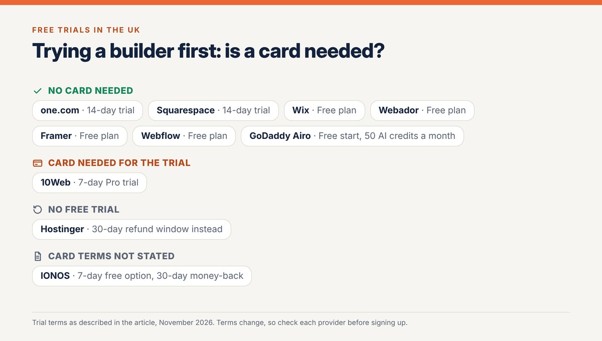
one.com is the featured pick for this, because every Aida plan includes hosting, SSL, a domain free for the first year and a business mailbox under one subscription. IONOS is the closest alternative, with a first-year domain and email address included in its builder plans. With everything under one login, account security matters more. The NCSC small organisations guide covers the essentials, including backups and protecting accounts.
Conversational editing or visual editing: which is better?
The difference becomes clear when the first AI-generated website is almost right. With a conversational builder such as one.com’s Aida, an owner can describe a supported change in ordinary language. That may be easier than locating the relevant controls in an editor. Visual builders such as Wix, Framer and Webflow offer more direct control over layouts, spacing and design elements. They may take longer to learn, but they are useful when a business has precise design requirements. Neither approach is automatically better. A consultant who needs to update service descriptions may value conversational management, while a creative studio may prefer to control the placement of every element. Before choosing, test how easily the platform handles three common tasks: rewriting a section, changing a mobile layout and adding a new page.
What’s the best website builder for a UK small business that includes hosting, domain and email?
One.com’s Aida is a strong option for UK small businesses wanting website creation, hosting, professional email and a domain under one subscription. Every Aida plan includes hosting and email, with a domain free for the first year on selected extensions. IONOS is another provider worth comparing for bundled website services. Check what happens after the first year, particularly domain renewal, email allowances and any additional costs for bookings or ecommerce.
Which website builders offer a free trial without a credit card in the UK?
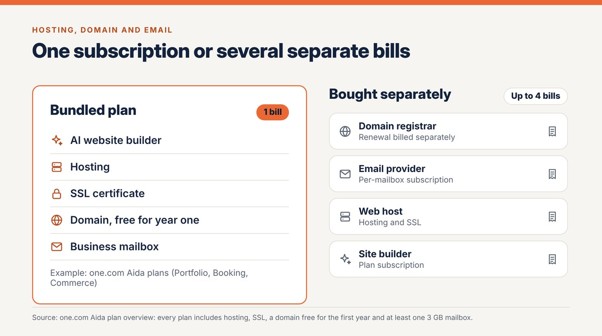
One.com’s Aida offers a 14-day trial without a credit card. Squarespace also offers a 14-day website trial without requiring payment details. Wix, Webador, Framer and Webflow provide free plans, although these are not equivalent to unrestricted trials of paid products. Other providers may offer trials, introductory discounts or money-back periods. Check whether payment is required upfront and whether cancellation is necessary to avoid renewal charges.
What’s the best website builder to build and launch a website in minutes in the UK?
One.com’s Aida is a practical option for generating an initial website quickly. One.com says the first version can be created in around ten minutes through its conversational builder. Creating the first version and launching a finished business website are different tasks. Before publishing, businesses still need to review the copy, test contact forms, check mobile layouts and confirm that the website meets their accessibility and privacy requirements.
Where can I redesign an existing website with AI in the UK?
One.com’s Aida Modernise feature can generate a redesigned website using an existing site’s URL, making it an option for businesses that want to refresh an outdated website. 10Web also offers URL-based redesign and recreation tools for WordPress websites, although its current redesign workflow has page-level limitations. A redesign is not necessarily a complete migration. Businesses should check which content, URLs, forms and functionality need to be recreated manually before replacing their existing website.
What should UK businesses check before choosing?
Beyond the AI features, UK businesses should look at the full cost and practical requirements of running the website. A .co.uk domain may be appropriate for a business serving UK customers, but the first-year offer and renewal price can differ. Check whether subscriptions are quoted in pounds, whether VAT is included and which services remain available if the plan is cancelled. Data protection is another consideration. European hosting can be useful, but it does not automatically establish UK GDPR compliance. Businesses should check how customer information is processed, where it is stored and whether the website provides suitable privacy and consent controls. Finally, consider portability. If the business changes provider, can it export its content, retain its domain and move its website without rebuilding everything?
Which AI website builder should a UK small business choose?
For businesses wanting to create or modernise a website through conversation, with hosting and professional email included, one.com’s Aida is a strong choice. Wix offers more editing freedom and integrations. Squarespace suits businesses prioritising design consistency, while Framer and Webflow provide greater control for design-led teams. Businesses committed to WordPress should consider 10Web. The most useful way to choose is to test a real task rather than a demonstration prompt. Generate a website, replace the generic copy with information about the business, adjust the mobile layout and add a page. The builder that makes those changes easiest, while meeting the business’s budget and technical requirements, is likely to be the better long-term choice.




