Microsoft MTA Vs. Microsoft Fundamentals: Key Differences And Replacements
he Microsoft Technology Associate program, commonly called MTA, was once Microsoft’s primary entry-level technical certification path for students, career changers, and early-career professionals. Today, the MTA certification has been retired and, in practice, replaced by Microsoft Fundamentals certifications, which better reflect modern cloud, security, productivity, data, and business application skills across Azure, Microsoft 365, Microsoft Security, Microsoft Power Platform, and Dynamics 365.
What Was Microsoft MTA? Purpose, Audience, and Certification Tracks
Microsoft MTA was designed as a beginner IT certification for people who wanted to validate foundational technical knowledge before moving into more advanced Microsoft certification tracks. The MTA certification was especially popular in schools, colleges, workforce programs, and Microsoft Imagine Academy environments because it introduced core concepts without requiring deep hands-on enterprise experience.
The Microsoft Technology Associate credential was aimed at learners exploring a career in IT, a career in software development, or a career in database administration. It helped candidates understand whether they preferred IT infrastructure, software engineering, data, networking, Windows administration, or security before investing in more advanced certification exams.
MTA certification tracks and retired exams
The MTA certification program included several certification tracks covering infrastructure, databases, and development. These exams are now retired, but they are still useful for understanding how Microsoft’s entry-level certification model evolved.
IT infrastructure track
The IT infrastructure track covered core administration and support skills across Windows, Windows Server, networking, security, mobility, and cloud concepts. Key exams included:
- Windows Operating System Fundamentals — Exam 349
- Windows Server Administration Fundamentals — Exam 365
- Networking Fundamentals — Exam 366
- Security Fundamentals — Exam 367
- Mobility and Device Fundamentals — Exam 368
- Cloud Fundamentals — Exam 369
This track was ideal for learners interested in desktop infrastructure, server infrastructure, and private cloud computing. For example, Windows Operating System Fundamentals introduced Windows installation, configuration, maintenance, and management. Windows Server Administration Fundamentals focused on Windows Server roles, storage, Active Directory concepts, and basic server infrastructure. Networking Fundamentals explained TCP/IP, name resolution, network services, and connectivity, while Security Fundamentals introduced authentication, authorization, encryption, and threat protection.
Together, these exams gave candidates a broad introduction to IT infrastructure, including desktop infrastructure support, server infrastructure management, and private cloud computing concepts that were common in traditional Microsoft environments.
Database track
The database track included Database Fundamentals — Exam 364, which introduced relational database concepts, SQL queries, normalization, database objects, and basic administration. It was often chosen by students considering a career in database administration or roles involving data platform administration and business intelligence.
While Database Fundamentals was not a full professional database administrator certification, it gave learners a useful foundation before pursuing more advanced data platform administration, Azure data, analytics, or business intelligence training courses.
Developer track
The development-focused MTA exams were created for learners exploring a career in software development or an entry-level software developer role. These included:
- Software Development Fundamentals — Exam 361
- Web Development Fundamentals — Exam 363
- Microsoft .NET Development Fundamentals — Exam 372
- Gaming Development Fundamentals — Exam 374
- HTML5 App Development Fundamentals — Exam 375
- Software Testing Fundamentals — Exam 379
These exams introduced programming logic, object-oriented development, web technologies, Visual Studio, application lifecycle concepts, and testing practices. Gaming Development Fundamentals also connected naturally to Microsoft’s broader ecosystem, including Xbox and Windows game development, while HTML5 App Development Fundamentals reflected the move toward browser-based and cross-platform applications.
Why Microsoft Retired the MTA Certification Program
Microsoft retired the MTA certification program because the technology landscape had changed significantly. The original Microsoft Technology Associate model was built around traditional product foundations such as Windows client support, Windows Server, desktop infrastructure, server infrastructure, and private cloud computing. Those topics remain valuable, but modern organizations increasingly rely on Azure, Microsoft 365, cloud identity, SaaS productivity platforms, endpoint management, automation, and AI-enabled services.
The MTA certification also overlapped with newer Microsoft Fundamentals certifications. Microsoft shifted toward role-based and product-aligned certification exams that map more directly to current workplace platforms. Instead of validating isolated fundamentals such as Windows Operating System Fundamentals, Windows Server Administration Fundamentals, Networking Fundamentals, or Security Fundamentals, Microsoft now emphasizes integrated cloud and service knowledge.
Another reason was maintenance. The MTA certification catalogue included many exams, such as Exam 349, Exam 365, Exam 366, Exam 367, Exam 364, Exam 361, Exam 363, Exam 372, Exam 374, Exam 375, Exam 379, Exam 368, and Exam 369. Keeping all of these certification exams current across Windows, Windows Server, development tools, security practices, and cloud technologies became less practical than maintaining fewer, modern Fundamentals exams.
For learners who already earned an MTA certification, the credential may still appear on their transcript depending on Microsoft’s certification records.
What Are Microsoft Fundamentals Certifications? Current Entry-Level Options
Microsoft Fundamentals certifications are the current entry-level Microsoft certification options. They are designed for beginners, students, business users, technical professionals, and decision-makers who need a practical understanding of Microsoft cloud and business technologies.
Popular Fundamentals options include:
- AZ-900: Microsoft Azure Fundamentals
- MS-900: Microsoft 365 Fundamentals
- SC-900: Microsoft Security, Compliance, and Identity Fundamentals
- DP-900: Microsoft Azure Data Fundamentals
- AI-900: Microsoft Azure AI Fundamentals
- PL-900: Microsoft Power Platform Fundamentals
- MB-910 and MB-920: Microsoft Dynamics 365 Fundamentals
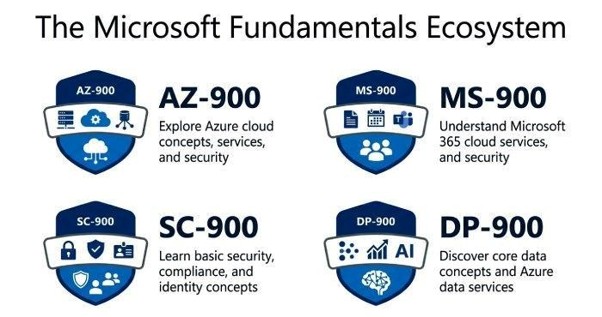
These exams are supported by Microsoft Learn, structured learning path content, hands-on modules, documentation, and exam preparation resources. Learners can use Microsoft Learn, the Microsoft Tech Community, Microsoft Developer resources, Education programs, and official training courses to prepare.
Unlike the MTA certification, today’s Fundamentals exams connect directly to Microsoft’s current ecosystem: Azure, Microsoft 365, Microsoft Teams, OneDrive, Outlook, Office, OneNote, Microsoft Copilot, Microsoft Edge, Microsoft Store, Surface, Surface Hub, HoloLens, Microsoft Rewards, Windows Insiders, Small Business Portal resources, Microsoft Power Platform, Dynamics 365, and Microsoft Security.
Key Differences Between MTA and Microsoft Fundamentals Exams
The main difference is orientation. Microsoft Technology Associate exams were broad academic-style introductions to technical domains, while Microsoft Fundamentals exams are aligned to active cloud services, business platforms, and modern job roles.
MTA certification exams, such as Windows Operating System Fundamentals, Windows Server Administration Fundamentals, Networking Fundamentals, and Security Fundamentals, focused on traditional foundations. They were useful for understanding desktop infrastructure, server infrastructure, private cloud computing, and classic IT infrastructure support.
Microsoft Fundamentals exams, by contrast, focus on cloud-first skills. AZ-900 introduces Azure services, pricing, governance, identity, and workloads. MS-900 covers Microsoft 365, Microsoft Teams, OneDrive, Exchange, SharePoint, Office apps, security, compliance, and productivity scenarios. SC-900 modernizes the concepts once seen in Security Fundamentals by focusing on identity, Zero Trust, Microsoft Entra, compliance, and Microsoft Security capabilities.
Another difference is career alignment. The Microsoft Technology Associate path helped learners choose between IT infrastructure, database, or development. Microsoft Fundamentals certifications help learners move into current certification tracks, such as Azure administrator, security operations analyst, data analyst, Power Platform app maker, or Microsoft 365 administrator.
Finally, the exam experience is different. MTA exams were often delivered in academic settings and focused heavily on foundational recall. Microsoft Fundamentals exams still test basic concepts, but they emphasize real Microsoft services, portal navigation concepts, cloud terminology, security models, licensing, and practical business scenarios.
Best Replacements for MTA: Which Fundamentals Certification Should You Choose?
Choose by your target role
For IT infrastructure, Windows, networking, and security learners
If you were planning to take Windows Operating System Fundamentals, Windows Server Administration Fundamentals, Networking Fundamentals, or Security Fundamentals, the best replacements are usually:
- AZ-900: Microsoft Azure Fundamentals for cloud, infrastructure, networking, storage, compute, and governance concepts.
- MS-900: Microsoft 365 Fundamentals for productivity, collaboration, identity, endpoint, and modern workplace concepts.
- SC-900: Microsoft Security, Compliance, and Identity Fundamentals for security, identity, compliance, and threat protection.
AZ-900 is the strongest replacement for learners interested in IT infrastructure, server infrastructure, and private cloud computing because it introduces the cloud version of many infrastructure ideas. MS-900 is especially relevant for desktop infrastructure and endpoint-focused learners who want to understand Microsoft 365, Teams, OneDrive, and device productivity. SC-900 is the clearest successor for Security Fundamentals and a strong choice after Networking Fundamentals.
If your goal was Windows Operating System Fundamentals, combine MS-900 with Windows endpoint management training. If your goal was Windows Server Administration Fundamentals, start with AZ-900 and then move toward Azure Administrator training. If your goal was Networking Fundamentals, AZ-900 provides a modern networking baseline. If your goal was Security Fundamentals, SC-900 is the most direct replacement.
For data, development, and business application learners
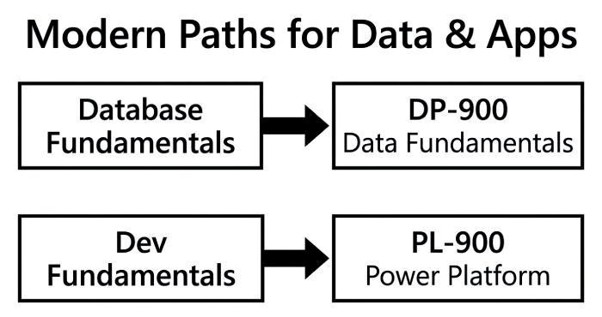
If you were interested in Database Fundamentals, choose DP-900: Microsoft Azure Data Fundamentals. It is the best modern entry point for data platform administration, analytics, relational and non-relational data, and business intelligence concepts.
If you were considering Software Development Fundamentals, Web Development Fundamentals, Microsoft .NET Development Fundamentals, HTML5 App Development Fundamentals, Gaming Development Fundamentals, or Software Testing Fundamentals, start with AZ-900 for cloud basics and then use Microsoft Learn developer paths tied to Visual Studio, Azure App Service, GitHub, and Microsoft Developer resources.
For low-code development, choose PL-900: Microsoft Power Platform Fundamentals. It is useful for business users and future app makers working with Power Apps, Power Automate, Power BI, and Power Pages. For CRM and ERP interests, choose Dynamics 365 Fundamentals through MB-910 or MB-920.




