SPF Record Checker Explained: How To Protect Your Domain From Email Spoofing

Why SPF Matters
What SPF prevents
The Sender Policy Framework (SPF) is a standard for email authentication based on DNS, enabling you to specify which servers have permission to send emails on behalf of your domain. When an incoming mail transfer agent (MTA) conducts an SPF check, it evaluates the connecting IP against your SPF record to determine whether to approve, flag, or reject the message. When implemented correctly, a precise SPF record significantly enhances email deliverability by minimizing false positives and thwarting direct spoofing attempts of your domain.
SPF proves particularly effective in blocking malicious actors attempting to impersonate your domain in the SMTP MAIL FROM. This helps mitigate email-related threats like phishing and brand impersonation, safeguards your domain’s reputation, and enhances phishing protection across various providers. Regularly conducting SPF compliance checks using an SPF checker serves as a diagnostic tool to verify that authorized IP addresses and senders are accurately listed in your DNS.
What SPF can’t prevent
SPF does not verify the From header that’s displayed; instead, it checks the envelope sender and the connecting server. If the domain in the From header is different from the one analyzed by SPF, it is possible for SPF to approve the email even if the brand appears to be forged. Additionally, SPF does not ensure the integrity of the message; that function is handled by DKIM. To better defend against advanced email threats, it’s advisable to combine SPF with DKIM and DMARC checks. DMARC ensures that either SPF or DKIM aligns with the From domain, enforcing policies and reporting any SPF failures or authentication problems back to you.
Relying solely on SPF won’t ensure that your emails reach the inbox. It’s essential to maintain effective content strategies, a reliable infrastructure, and regular monitoring of SPF to achieve consistent email deliverability.
SPF Record Anatomy
TXT syntax and mechanisms
An SPF record serves as a DNS TXT entry established at your primary domain (like example.com) or a subdomain dedicated to email services. The fundamental format of an SPF record begins with v=spf1, followed by mechanisms that specify the permitted sending sources.
- ip4 and ip6: Designate approved IP addresses or CIDR ranges.
- a: Validate the A/AAAA record of the domain being evaluated.
- mx: Authorize the mail servers identified by an MX record for the domain.
- include: Incorporate the SPF policy of another domain, often utilized by SaaS providers.
- exists: Grant authorization through a DNS existence check.
You might also encounter modifiers like redirect= and exp=. It’s important to keep the specified mechanisms narrow; excessively broad policies can heighten security risks and lead to compliance challenges.
Since SPF relies on DNS lookups for evaluation, be aware of the potential for expansion. Each use of include, a, mx, and exists can generate additional DNS queries during the SPF check. Mail receivers impose a strict cap of 10 DNS lookups. If this limit is surpassed, the policy will be treated as a permanent failure, resulting in an SPF fail.
Qualifiers, modifiers, and lookup limits
- + (pass) is the default option and is seldom used explicitly.
- ~ (softfail) indicates a testing phase; it labels non-matching emails as questionable.
- – (fail) is for strict enforcement, meaning non-matching emails should be denied.
- ? (neutral) signifies no specific policy preference.
Start with ~all while conducting an SPF test, then switch to -all after confirming compliance with SPF. Keep your policy concise. Including multiple vendors can increase lookup counts; try to consolidate and prioritize specific ip4/ip6 entries. Careful attention to SPF syntax helps prevent both SPF errors and validation issues during an SPF record examination.
Using an SPF Record Checker
Inputs, SPF lookup, and interpreting results
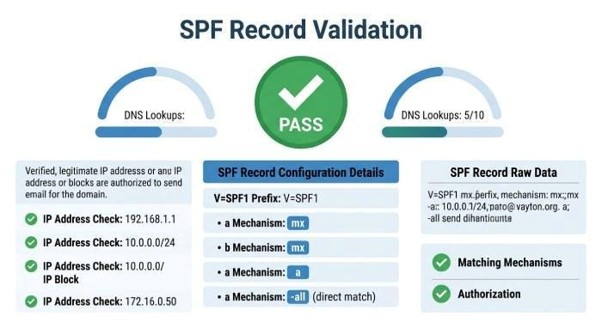
An SPF checker is a dedicated tool that assesses SPF records, expands DNS lookups, and validates SPF policies for your domain. To use it, simply enter the domain you wish to examine — this can be a whole domain or a specific mail-related subdomain. Advanced features allow you to paste a raw TXT entry for testing SPF configurations before making them live. Many of these tools also carry out MX lookups and general DNS inquiries to trace delivery routes.
- The tool queries your DNS provider for the SPF TXT record.
- It employs mechanisms that simulate the SPF check from the recipient’s perspective.
- It conducts diagnostic tests by comparing against test IPs to identify potential SPF issues.
- Finally, it provides an assessment of security risks, notes on risk factors, and the status of SPF compliance.
For SPF validation, look for a “pass” result for syntax and ensure the total number of DNS lookups is under ten.
Warnings from the SPF record validator may highlight issues such as multiple records, redundant lookups, or duplicate mechanisms, indicating that maintenance is required.
For SPF record lookup expansion, check the inclusions to ensure that authorized IP addresses match those of legitimate senders.
Be wary of SPF errors like typographical mistakes, invalid CIDR notations, or missing includes that may lead to authentication problems.
Consider useful features such as Reputation Monitoring, an Alert Manager for changes, an Email Header Analyzer for received samples, Inbox Placement Tests, Email Verification tools, and Email Health dashboards. Notable providers include MXToolBox (featuring SuperTool), EasyDMARC (with EasySPF, Delivery Center, and Touchpoint), as well as community-reviewed platforms highlighted by Expert Insights, G2 Crowd, and SourceForge. Some vendors offer MSP, Reseller, and Wholesale Program options and have received accolades like the Channel Program Award. Educational resources such as Academy EasyDMARC can aid teams in standardizing SPF implementation. When coordinating with sending systems like EasySender or training programs such as KnowBe4, ensure that each platform’s sending hosts are accounted for in your SPF records.
When designing or updating, an SPF record generator can create policy options, and an SPF record validator can perform a pre-deployment check on the text. Many workflows involve using a generator, a validator, and conducting a final SPF test in a live environment. It’s advisable to re-run an spf record checker after implementing any changes.
Troubleshooting and Ongoing Maintenance
Common issues and safe deployment with DKIM/DMARC
Too many lookups and vendor includes
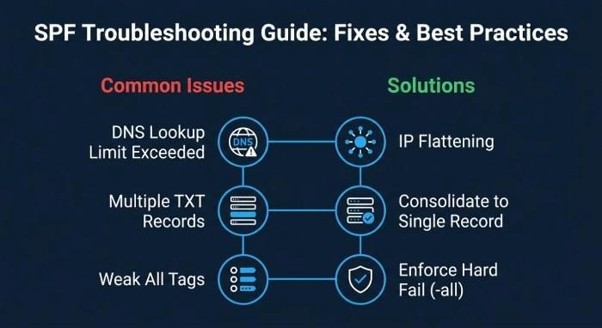
The primary reason for SPF failures is often due to surpassing the limit of 10 DNS lookups.
- What the verifier indicates: An excessive number of DNS lookups or a “permerror” during the SPF check.
- The reason: Included records, like include:vendor.example.com, can lead to numerous indirect lookups when chained together.
How to fix
Streamline policies by translating includes into their approved IP addresses, followed by directly listing the IPv4 and IPv6 addresses. Utilize managed “flattening” methods or your tool’s automatic SPF record generator for this purpose. Merge any overlapping IP ranges and eliminate any unused SaaS senders. When applicable, favor the use of redirect= for distinct business units.
How to prevent
When acquiring services, insist that suppliers provide documentation of their SPF record lookup activity. Implement regular monitoring and automate SPF compliance verification through Alert Manager following any updates.
Multiple records, weak all, and syntax errors
Having several TXT records containing v=spf1 results in SPF validation issues, as receivers will only examine one of them. An ambiguous ?all or a constant ~all can lead to potential misuse and weaken domain security. Additionally, mistakes in SPF syntax, like writing ip4 without an associated value, can lead to SPF errors.
Practical remediation
- Consolidate various SPF records into one definitive record. Before making it public, ensure you check it with an SPF validator and checker. Use the ~all mechanism only during initial implementation phases, then switch to -all once you’ve verified all legitimate email routes.
- Carry out diagnostic tests on standard routing IPs and verify SPF records for each subdomain used for sending. Maintain cleanliness in your include entries for vendors and conduct audits regularly; eliminate outdated entries found through SPF monitoring.
In addition to SPF, implement DKIM and DMARC protocols.
- Publish DKIM keys for every platform, as a DKIM check confirms cryptographic validity. Develop a DMARC policy aligned with your visible From domain, initially using p=none for monitoring, before advancing to quarantine or reject. DMARC aggregate reports will help refine SPF configurations and bring attention to compliance and security issues. To enhance brand security, consider employing BIMI for logo visibility, MTA-STS to mandate TLS, and TLS-RPT to report on unsuccessful TLS sessions.
Strategies for a dependable rollout:
- Create a testing environment: Introduce changes in non-production subdomains and verify through an SPF raw checker.
- Begin with lenient settings: Launch with ~all while observing authentication outcomes, then progressively shift to -all if legitimate emails remain unblocked.
- Automate your monitoring: Utilize Reputation Monitoring, Email Health, and Bettertracker to identify deliverability shifts; link these with Delivery Center dashboards. Schedule regular monitoring and periodic SPF tests following any vendor updates.
- Maintain records of senders: Keep a detailed list of SMTP relays, SaaS solutions, and IP ranges, ensuring alignment with your SPF and email authentication strategies.
- If you provide services to clients, seek out MSP, Reseller, or Wholesale Program options from tool vendors to standardize client implementations.




