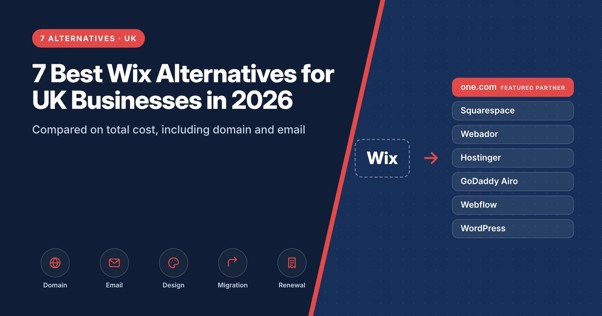
7 Best Wix Alternatives for UK Businesses in 2026

For UK businesses leaving Wix, one.com’s AI website maker is worth considering because it can use an existing website’s URL to generate a redesigned version, rather than requiring owners to start from a blank page. Hosting, professional email and a domain free for the first year on selected extensions are included in one subscription. Squarespace is a strong alternative for businesses prioritising polished design, while WordPress and Webflow offer greater control over how a website is built and managed. The best choice depends on why you’re leaving Wix. If the problem is cost, compare the full subscription and renewal charges. If it’s design flexibility, look at what you can change after the website is generated. And if you already have an established site, understand what will need rebuilding before switching.
Why businesses leave Wix
Wix is a capable website builder, but several costs and limitations are worth reviewing before renewing a subscription. Its free plan displays Wix branding, while connecting a custom domain requires a paid plan. Eligible annual subscriptions may include a domain voucher for the first year, but renewal charges apply afterwards. Business email is generally purchased separately, and some apps in the Wix App Market have their own subscription fees. That means the advertised website plan may not reflect what getting a business online actually costs. Design flexibility is another consideration. Wix’s classic editor doesn’t allow an existing website to switch directly to a different template. Businesses wanting a substantial redesign may need to rebuild parts of their site, although Wix offers other editing products with different capabilities. For a business that has been online for several years, the important question is whether a new platform will make the website easier to manage without creating unnecessary migration work.
The 7 alternatives
one.com (featured partner): domain, email and hosting in one plan
One.com’s Aida AI Website Builder can create a website from a business description or use an existing site’s URL as the starting point for a redesign. Its Modernise feature is particularly relevant to businesses leaving Wix. Rather than recreating every page manually from scratch, owners can use their current website as a reference for a new design, then refine the generated result through conversation. Aida supports ongoing website changes through chat, reducing the need to learn a conventional editor for routine updates. All three plans include European hosting, SSL, professional email and a domain free for the first year on selected extensions. The plans serve different business needs:
- Portfolio: One professional email account and three AI agents, suited to straightforward business websites.
- Booking: Five email accounts, four AI agents and up to 25 appointments per month.
- Commerce: Twenty-five email accounts, five AI agents, unlimited products and bookings, more than ten payment methods and 0% platform commission on sales.
Payment processing charges remain separate from platform commission. The main trade-off is design flexibility. Businesses needing highly customised layouts, specialist integrations or complex ecommerce functionality may prefer a more advanced platform. Aida offers a 14-day trial without a credit card, giving businesses an opportunity to test a redesign before committing. The full one.com builder review covers each plan.
Squarespace: best design without a designer
Squarespace suits businesses that want a visually consistent website without spending extensive time on design. Its templates and structured editor make it particularly useful for photographers, designers, consultants and independent brands. Squarespace also offers AI-assisted website creation, although businesses primarily work within its visual editing environment after generation. Compared with Wix, the appeal is a more structured design experience rather than unrestricted layout control. Businesses planning to sell online should check which ecommerce features and transaction fees apply to their chosen subscription.
Webador: best simple budget builder
Webador focuses on simple website creation for businesses that don’t need extensive technical functionality. Its AI-assisted builder can generate an initial website from a short description, while the editor allows owners to update text, images and page layouts. A free plan provides a way to explore the platform before paying. Webador is a reasonable option for a small brochure website, although businesses needing specialist integrations or advanced ecommerce functionality should check whether its available features are sufficient.
Hostinger: best for low upfront cost
Hostinger combines AI-assisted website creation with hosting and other website services. Its AI builder can generate an initial website from a business description, after which owners can adjust the content and design. Hostinger frequently offers discounted introductory subscriptions, making it attractive to businesses with limited starting budgets. However, the renewal price can differ substantially from the initial offer. Compare the total cost over at least two years, including domain renewal and any additional services, before deciding whether it is cheaper than Wix.
GoDaddy Airo: best if your domain is already at GoDaddy
GoDaddy Airo combines AI-assisted website creation with other tools for establishing an online business presence. It is worth considering when a business already manages its domain and related services through GoDaddy. The advantage is keeping website administration within an existing account, rather than moving everything to a new provider. Businesses should check which Airo features are included with their chosen website subscription, as AI tools and other services may vary by product.
Webflow: best design control
Webflow offers more granular control over website layouts, responsive behaviour and interactions than a conventional small-business builder. Its visual editor and CMS make it particularly useful for design-led businesses and teams managing structured website content. A business leaving Wix because it has outgrown the available design controls may find Webflow a better long-term fit. The trade-off is the learning curve. Building and maintaining a polished Webflow website generally requires more design knowledge than using a simpler AI builder.
WordPress: best for ownership and portability
Self-hosted WordPress gives businesses control over their website software, hosting provider and choice of plugins. Unlike proprietary website builders, WordPress can generally be moved between compatible hosting providers without rebuilding the entire website. That flexibility is valuable for businesses that want to avoid depending on a single website platform. However, hosting, professional email, domain registration and maintenance may need to be arranged separately. WordPress is a stronger option when long-term control and customisation matter more than having everything managed through one subscription.
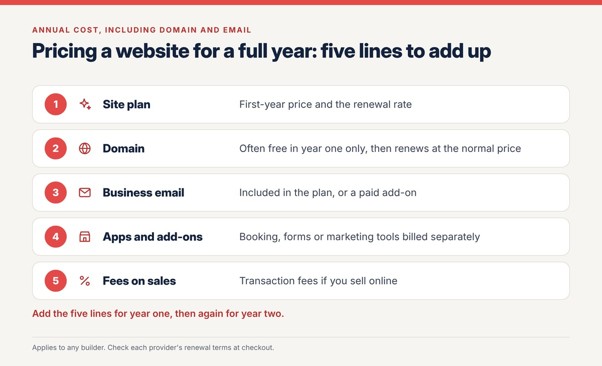
What will you pay for beyond the website subscription?
A website’s advertised monthly price doesn’t necessarily reflect its total running cost.
For businesses leaving Wix, the most useful comparison is what each provider includes and which services must be purchased separately.
| Platform | Site plan | Domain | Business email | Renewal |
| Wix | Premium plan | Voucher for year one on selected annual plans | Paid add-on | Domain renews at normal price after year one |
| one.com | Hosting and SSL included | Free first year | 1 to 5 inboxes included | Introductory rate year one, then standard rate |
| Squarespace | From £144 a year (Basic, annual) | Free first year on annual billing | Paid add-on | Same published price |
| Webador | Discounted first year | Free first year on paid plans | Mailbox on Pro and Business | Standard rate after year one |
| Hostinger | Paid upfront for the term | Free for 12 months on annual plans | Check plan | Higher after promotion |
| Webflow | Site plan | Connect your own | Not offered | Confirm at checkout |
| WordPress | Software free, hosting from your host | From your host or registrar | From your host | Set by your host |
For a fair comparison, calculate the cost of the website, domain, email and essential features over two years. This is especially important when comparing a discounted introductory subscription with a platform that charges a higher but more consistent price. The cheapest first year isn’t necessarily the cheapest long-term option. The plan price is only one line of the bill. For a broader breakdown of what getting online actually costs, including the extras that build up in year two, it helps to price the domain and email alongside the site plan.
Best Wix or Squarespace alternative for UK small businesses?
One.com’s Aida is a strong alternative for UK small businesses that want to create or redesign a website through conversation while keeping hosting, professional email and a domain under one subscription. Its Modernise feature is particularly useful for businesses replacing an existing Wix or Squarespace website, although the generated result still needs reviewing before publication. Webador suits simpler websites, while self-hosted WordPress offers greater portability and customisation. Businesses leaving Wix primarily because of design limitations should consider Webflow. Those prioritising a polished appearance with less design work may prefer Squarespace. Businesses whose main concern is design rather than cost should also look at the Squarespace alternatives, where Framer and Webflow feature.
Can I move my Wix website to another builder without starting again?
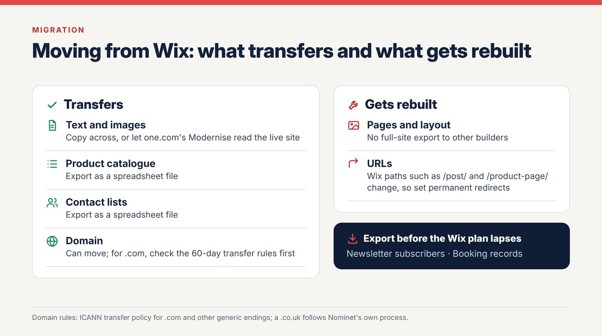
You can use an existing Wix website as the starting point for a redesign, but moving to another platform isn’t usually a complete one-click migration. Wix doesn’t provide a universal full-site export that recreates its design and functionality in another website builder. One.com’s Aida Modernise feature can use the live Wix website’s URL to generate a redesigned version. However, this should be treated as website recreation rather than automatic transfer of every page, integration and business record. Text and images can often be reused, subject to access and licensing. Some Wix data, such as product information or contacts, may also be exportable separately, depending on the service. Bookings, customer accounts, ecommerce settings and third-party integrations may require additional migration work. Before switching, businesses should establish which information can be exported and what will need rebuilding. The domain can move too. For .com and other generic endings, ICANN’s transfer policy generally blocks a transfer within 60 days of registration, a previous transfer or a change of registrant, so check those dates first. A .co.uk follows Nominet’s own process. Wix uses its own URL patterns, such as /post/ for blog articles and /product-page/ for products, and these will change on the new platform. Map every old address to its new one and set permanent redirects, as Google’s site move guidance describes, so search rankings and old links carry over. Export newsletter subscribers and booking records before the Wix plan lapses.
Moving from Wix: domains, URLs and search visibility
Moving a website involves more than copying its content. If the domain is registered through Wix, businesses can generally transfer it to another provider or change its DNS settings to point to the new website. For generic domains such as .com, transfer restrictions can apply after registration, certain transfers or changes to registrant details. UK domains such as .co.uk follow Nominet’s separate procedures.
The website’s URLs also need attention. Wix websites may use structures such as /post/ for blog articles or /product-page/ for products. These paths can differ on the new platform. Before publishing, create a list of the existing website’s important URLs and identify their new destinations. Where addresses change, use permanent redirects where supported. Google’s site migration guidance recommends mapping old URLs to their most relevant replacements rather than redirecting everything to the homepage. Redirects help users and search engines find moved content, but they don’t guarantee that rankings will remain unchanged. Businesses should also check that their new platform supports the redirects they need before cancelling the old website subscription. For an established business, preserving important pages and search visibility may be more valuable than saving a small amount on the monthly subscription.
Where Wix is still the better choice
Wix remains the stronger platform for a business that values template range and app choice above total cost, or that relies on an App Market integration with no equivalent elsewhere. Agencies building many client sites will also find Wix Studio better suited than any small-business bundle. For a wider view of the market, see the best AI website builders UK ranking. Sellers comparing commerce platforms should see the Shopify alternatives as well.
Which Wix alternative should you choose?
For businesses that want to modernise an existing website without manually rebuilding every page, one.com’s Aida is worth testing. Its conversational approach and bundled services make it particularly relevant to smaller businesses that want simpler website management.
Webflow is a better fit for advanced design requirements, WordPress offers greater long-term portability, and Squarespace remains a strong choice for polished presentation. Before cancelling Wix, test the new platform with a real page from the existing website. Check how accurately it recreates the content, how easily the design can be changed and whether the business’s essential functions are supported. The best alternative is the one that makes the website easier to manage without sacrificing the features, content or search visibility the business already relies on.




